


Ashampoo UnInstaller 16: Remove Programs and Leftover Files
Windows uninstallers can leave folders, settings, and temporary files behind. If you need to uninstall programsand clean up leftover data, Ashampoo UnInstaller 16 provides tools for both.
Use it to uninstall programs , remove unwanted preinstalled apps, and manage browser extensions.
Why Use a Dedicated Uninstaller?
When you uninstall programs through Windows settings, the app’s uninstall routine may leave temporary files, settings, and registry entries behind.
Ashampoo UnInstaller 16 uses a four-step cleanup process to find and remove those leftovers.
Key Features
Compare the available tools below:
| Feature | Ashampoo UnInstaller 16 | Free Software | Other Professional Software |
| Real-Time Monitoring | Tracks installations | May only scan afterward | Varies by app |
| Bloatware Removal | Detects preinstalled apps | May be limited | Available in some apps |
| System Snapshots | Compare before and after | May be unavailable | Varies by app |
| Technical Support | Available through NovaTrading | May be unavailable | Varies by provider |
Everyday Benefits
1. Installation Monitoring
The software tracks file and registry changes when you install an app. When you uninstall programslater, it uses that record to identify related files and settings.
2. Remove Stubborn and Hidden Apps
Use forced uninstall for apps and toolbars that resist standard removal.
3. Profile-Based Cleanup
Profiles for thousands of apps help identify leftovers even when the original installation wasn’t monitored.
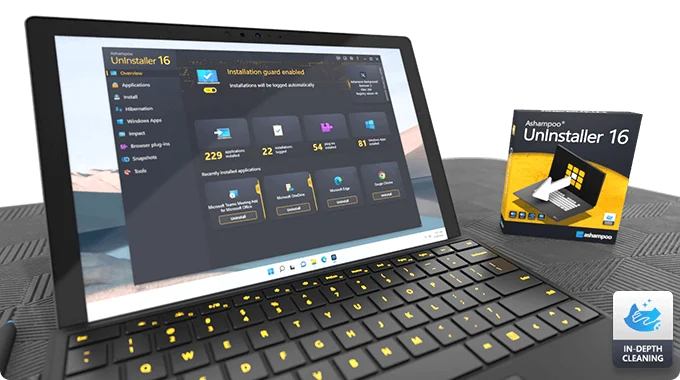
Main Benefits
Remove apps and check for leftover files, registry entries, and hidden data.
Installation monitoring records changes as apps are installed. For older apps, a scan helps identify leftovers. Built-in tools also cover system cleanup, registry maintenance, and startup management.
What’s Included With Your Purchase?
Your NovaTrading license includes these tools:
Perpetual commercial license: No monthly or annual subscription.
Advanced uninstallation: Real-time monitoring, forced uninstall, and batch removal.
Maintenance tools: Includes a registry cleaner, Windows Startup Tuner, and secure file deletion.
Browser extension manager: Find and remove unwanted browser add-ons.
NovaTrading support: Get help with activation and installation.
More Windows Maintenance Tools
Explore other tools to keep your Windows PC organized.
After removing apps you no longer use, consider WinOptimizer 28 for ongoing Windows cleanup and maintenance.
Frequently Asked Questions
Can Ashampoo UnInstaller 16 remove programs from a PC?
Yes. It removes programs and associated leftovers.
Does it remove leftover files?
Yes. It can clean up leftover files, registry entries, and hidden data.
Does it work with older programs?
Yes. It can scan for traces even if it did not monitor the original installation.
Can it help improve performance?
It can help by removing unnecessary data. Results depend on what is slowing down your PC.
Is it easy to use?
Yes. It offers automatic tools and straightforward controls.
Does it work on Windows 10 and 11?
Yes.
Is the license perpetual?
Yes. The perpetual license covers one PC.


Reviews
There are no reviews yet.